A page can rank on Google, look perfect in Chrome, and still be an empty shell to ChatGPT, Claude, and Perplexity.
The AI crawlers JavaScript problem has one usual cause. Most bots read the first HTML a server sends and stop, so text that scripts build afterward never reaches them.
Can AI crawlers execute JavaScript? Mostly no. No official page from OpenAI, Anthropic, or Perplexity says their bots run it, and the public evidence for rendering is partial and unconfirmed.
Closing this gap is core generative engine optimization work, because a page that cannot be read cannot be cited. The fix costs far less than the damage.
Why AI crawlers and JavaScript clash: the page you see is not the page they get
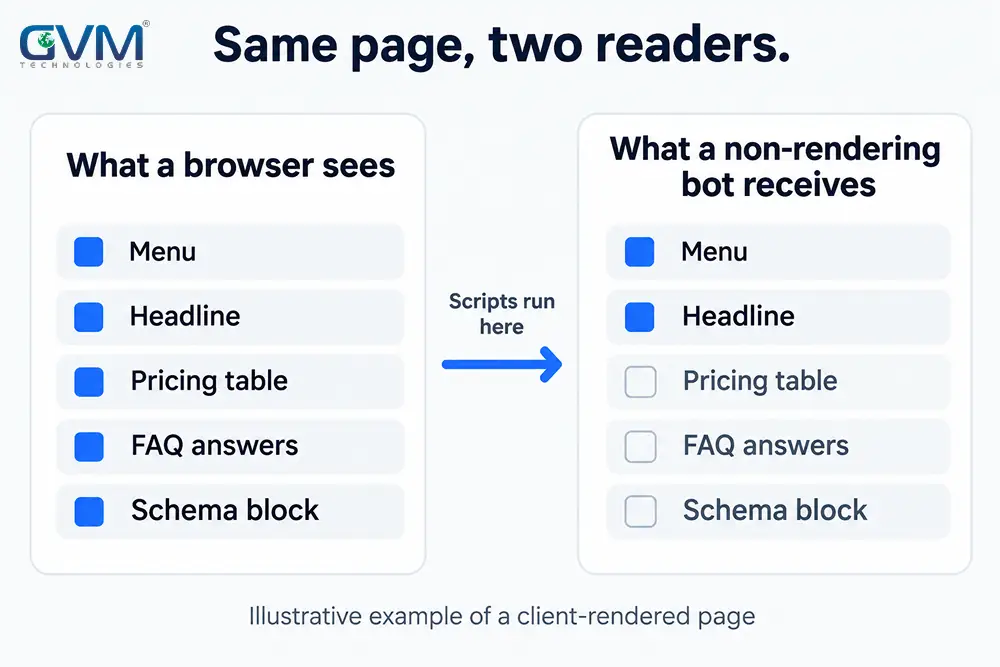
A server sends HTML first. Your browser then downloads scripts, runs them, and builds the page you actually see. A crawler that skips the last step keeps only the first version.
Server sends HTML  >  Scripts download  >  Scripts run  >  Page you see
[ many AI bots stop here ]                  [ browsers and Googlebot ]
Google closes the gap with a render queue. Its documentation says Googlebot queues pages with a 200 status for rendering, and that server-side or pre-rendering is still a great idea because “not all bots can run JavaScript.”
This is why the problem stays hidden. Your rankings hold, Search Console looks healthy, and no standard dashboard reports what an AI bot received.
Common mistake: Checking a page in the browser’s Elements panel. That panel shows the finished page, not the server response. Use view-source instead, as the test section below explains.
Which AI crawlers run JavaScript? Four visitors, four answers
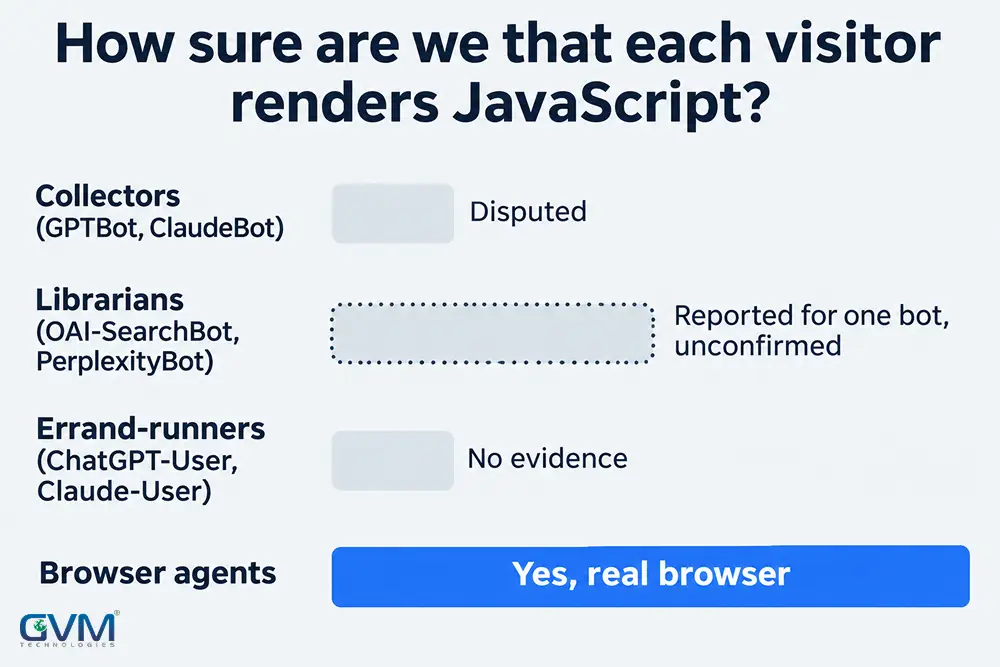
“AI crawlers” is not one group, so AI crawlers JavaScript behavior varies by job. GVM Technologies splits them into 4 visitors, because each reads a page differently and fails differently.
| Visitor | Examples | Job | Runs JavaScript? |
|---|---|---|---|
| 1. Collectors | GPTBot, ClaudeBot | Gather training data | Disputed for GPTBot, none seen for ClaudeBot |
| 2. Librarians | OAI-SearchBot, PerplexityBot, Googlebot | Build search indexes | Googlebot yes. OAI-SearchBot reported on some sites, unconfirmed |
| 3. Errand-runners | ChatGPT-User, Claude-User, Perplexity-User | Fetch one page when a user asks | No evidence of rendering |
| 4. Browser agents | Agent modes that drive Chrome | Click and read like a person | Yes, they use a real browser |
Pasting your URL into a chatbot tests visitor 3 only. It says nothing about visitors 1 and 2, which decide whether you appear when nobody pastes anything.
1. What the official documentation says
OpenAI’s bots page, Anthropic’s crawler article, and Perplexity’s bots page each describe what their agents are for. None of the three mentions JavaScript or rendering.
Silence is not proof either way. It means nobody has promised you that these bots will read script-built text.
2. What public testing found
A public analysis of hundreds of millions of AI-crawler fetches in 2024 found no rendering from the major bots. Some downloaded script files, but none ran them.
Gemini was reported as the exception, because it uses Google’s rendering infrastructure.
3. What changed in late 2026
Site-owner logs now suggest OpenAI’s search crawler may render some pages, after a delay. One beacon test matched an OpenAI address range.
OpenAI has not confirmed it, and the samples are small. No comparable evidence exists for Claude or Perplexity bots.
AI crawlers JavaScript rendering may grow, so plan for the worst case: treat any text that only scripts create as invisible.
You may also see “bots give up after 1 to 5 seconds.” No vendor publishes a timeout, so treat that number as folklore, not a specification.
What AI crawlers miss first on a JavaScript-heavy site
Few sites return a blank page. The usual failure is partial: the menu and footer arrive, while pricing, specs, and answers sit behind scripts.
| What disappears | Why | Fix |
|---|---|---|
| Prices and plan tiers | Fetched from an API after load | Render them in the HTML |
| JSON-LD from a tag manager | A script injects it after load | Output it in server HTML |
| Accordion and tab answers | Text loads on click | Ship full text, collapse with CSS |
| Lazy-loaded sections | Load only after scrolling | Server-render the whole page |
| Links built on click handlers | No href to follow | Use real anchor tags |
| Streamed sections | A loading placeholder ships first | Keep key copy outside the stream |
| Content behind a consent script | Waits for the banner logic | Serve copy before consent runs |
| Titles and canonicals set by script | Head tags change after load | Set them on the server |
Schema deserves a second look. Testing tools render JavaScript, so a block can validate perfectly and still be missing from the raw response.
Warning: Do not paste a hidden block of text for bots. Google’s hidden text policy covers it. Ship the same visible content to everyone.
Two ways to be invisible, and only one is JavaScript
Before rebuilding anything, separate “cannot read” from “cannot reach.”
- Cannot read: the content depends on scripts, which is the subject of this article.
- Cannot reach: robots.txt, a firewall, or bot protection blocks the visit before any HTML is served.
In GVM Technologies’ GEO audits, the second is the gap sites most often have never checked. A robots.txt that welcomes bots while a firewall returns 403 is a policy and a bouncer that disagree.
Bot-blocking toggles often ship switched on by default, so nobody chose them. OpenAI and Perplexity both say robots.txt changes take about 24 hours to apply, so retest after a day.
Test what AI crawlers get from your JavaScript pages in 10 minutes
Run this on 5 pages that earn money to measure your AI crawlers JavaScript exposure: the homepage, your main service, pricing, a location page, and a top article.
- Open view-source. Press Ctrl+U and search for one sentence, price, or headline you rely on. If it is missing, a non-rendering bot never saw it.
- Fetch the page as a bot. Request the URL with a bot user agent and search the response for the same text.
curl -s -A "GPTBot" https://example.com/pricing | grep -ci "your exact price"
- Count the words outside scripts. Compare that number with the words you see on screen. A JSON block inside a script tag is not readable text.
- Score the gap. Our rule of thumb: under 10% missing is fine, 10% to 40% means fix your money pages, and an empty root div or over 40% is urgent.
- Check status codes. Fetch with each bot’s user agent and expect HTTP 200. A spoofed user agent misses firewalls that verify IP ranges, so also check your logs against the ranges each vendor publishes.
- Repeat after releases. Framework upgrades and new plugins can quietly flip a route back to client-side rendering.
Google’s URL Inspection live test shows Googlebot’s version only. It cannot tell you what an AI bot received.
For a harder test, add an image request that exists only after scripts run, with a unique token in its path. Then search your access logs for that path and verify the source IP.
Which fix fits your stack for AI crawlers and JavaScript
The right AI crawlers JavaScript fix depends on how your site is built. Protect the pages that must be found, because the app behind a login needs none of this.
| Your situation | Fix | Effort | Trade-off |
|---|---|---|---|
| WordPress, Shopify, Webflow | Usually none; audit widgets | Hours | Third-party widgets are the weak spot |
| React, Vue, Vite single-page app | Prerender public routes at build | Days | Missed routes, stale pages |
| Same app, no developer | Prerendering service in front | Days | Recurring cost, verify parity |
| Next.js, Nuxt, SvelteKit, Astro | Server or static render | Days to weeks | Keep facts out of client fetches |
| Large catalog, live prices | Server render with caching | Weeks | More server load |
| Product with login | Static marketing site, app behind login | Weeks | Two surfaces to maintain |
Effort ranges are planning estimates, not quotes. For pricing context, see how SEO and GEO work is priced.
1. Make the prerender list impossible to forget
Prerender lists drift. A new page or blog post that nobody adds to the list ships as an empty shell, and the gap appears months later.
Generate the list from your sitemap, so every new route inherits the fix automatically.
2. Keep one source of truth for offers
A prerendered snapshot can say something different from the live app. We have seen a snapshot quote a 14-day trial while the app offered a free plan.
Feed both from the same data, then purge caches after every pricing change.
3. Watch AI site builders
Many AI site builders default to a client-rendered React shell. A site generated in an afternoon can ship an empty root div.
Ask for static or server output in the first prompt, then check view-source before launch. GVM Technologies treats crawler-ready output as a launch requirement in website development, not a later patch.
A worked scenario: the local booking widget
Illustrative scenario, not a client result. A plumbing company ranks well in Google Maps, yet assistants name competitors for “emergency plumber near me.”
Its booking widget loads service names, hours, and city names through scripts. The raw HTML holds a business name, a phone number, and little else.
The fix leaves the widget alone and changes 3 things:
- City names and service areas move into static HTML.
- Services and opening hours get plain text on each page.
- LocalBusiness schema goes into the server response.
Expect a removed barrier, not a guaranteed citation. Many local searches still happen in Maps, but the work is cheap and helps Google too. GVM Technologies audits this layer first in a typical GEO engagement.
Fixing rendering makes you readable, not cited
Rendering is the entry ticket. When a site is unreadable, assistants can fill the gap with other sources or guesses, which means wrong facts about your brand.
After the fix, three questions decide whether you get cited:
- Can one passage on the page stand alone as an answer?
- Does the page say something other sites do not?
- Do other sources confirm your facts?
Those are retrieval and trust questions, covered in how AI search ranks sources. Measure them with a citation baseline, not a feeling.
Myths about AI crawlers and JavaScript
Six beliefs keep AI crawlers JavaScript problems unfixed.
| Myth | What actually happens |
|---|---|
| “Google indexes me, so AI sees me” | Googlebot renders. Many AI bots do not |
| “My schema validates, so it is visible” | Validators render scripts. The raw page may lack it |
| “React makes sites invisible” | Client-only rendering does. React can render on a server |
| “Prerendering is cloaking” | Not when visitors and bots receive the same content |
| “AI traffic is tiny, skip it” | Fair for some niches, but the fix is cheap |
| “A fix stays fixed” | Releases, plugins, and new routes can undo it |
This also answers a common confusion about whether GEO is rebranded SEO. Rendering helps both, which is why we treat the two as one job.
FAQs
1. Do I need to rebuild my whole website?
No. Only public pages that must be found need server or static output. Keep the logged-in app as it is.
2. Is JavaScript itself the problem for AI crawlers?
No. Scripts for menus, forms, and animation are fine. The problem is text that exists only after a script creates it.
3. Do AI crawlers and Google AI Overviews both miss JavaScript content?
Google says its systems can process JavaScript that is not blocked. Its AI optimization guide still tells you to follow JavaScript SEO best practices, and says it ignores llms.txt files.
4. How long until AI tools see my fix?
Nobody can promise a date. OpenAI and Perplexity cite about 24 hours for robots.txt changes, while re-crawling and index updates vary. Track logs and a fixed prompt set over several weeks.
5. Can I test with a chatbot instead?
Only partly. A chatbot may use a cached copy or answer from memory, so a good answer does not prove the live page was read. Use raw HTML and logs.
6. Is this fix worth it if customers use Google Maps?
Usually yes. The work is cheap, and Google rewards pages it can read quickly too.
Look at the source before you judge the content
The AI crawlers JavaScript rule comes down to one habit: check what the server sends before you judge what the page says. Most visibility problems we see are settled in that first response.
Take the 5 pages that earn you money. Open view-source and search for the price, the headline, or the answer you want quoted. If one is missing, fix that page before writing anything new.
Next, confirm the bots can reach those pages at all. A firewall rule that returns 403 makes the rendering question irrelevant.
Then move the missing text into server or build-time HTML, and recheck every quarter, because releases quietly undo fixes.
Some crawlers may render more JavaScript next year, and none has promised to. A page that already ships its answer in plain HTML wins either way.
Want a second pair of eyes on your page source?
GVM Technologies includes this check in its SEO and GEO audit: raw HTML against the rendered page, bot access rules, and whether your prices and schema survive without scripts.
We have built SEO and GEO together since 2012, and our client case studies show the work. Our own homepage returns its H1 in raw HTML, and a GPTBot-style request gets HTTP 200.
Already working with an agency? These vetting questions show what to ask about this first.