FAQPage vs QAPage schema comes down to who writes the answers: your team (FAQPage) or your visitors (QAPage). Schema is code that tells search engines and AI tools what a page contains, so answers get quoted accurately.
Quick answer: use FAQPage for a visible FAQ you wrote, and QAPage only for 1 question that visitors answer. Since May 7, 2026, Google shows no FAQ rich results, and its AI search guide asks for no schema.
Key Takeaways
- FAQPage vs QAPage schema splits on authorship. FAQPage fits a visible FAQ written by the site, while QAPage fits 1 question with answers submitted by users.
- Rich results, the expandable answers under a listing, vanished for FAQ pages on May 7, 2026. The QAPage rich result remains documented as current.
- Google’s AI search guide lists no schema requirement, so neither type works as an AI citation lever.
- The FAQPage vs QAPage schema choice depends on page type, not on keywords or habit.
- Putting QAPage on an FAQ page or blog post breaks Google’s guidelines, and mixing both types on 1 page adds confusion.
- Most small business sites need FAQPage at most, and some pages need no FAQ schema at all.
What Is the FAQPage vs QAPage Schema Difference?
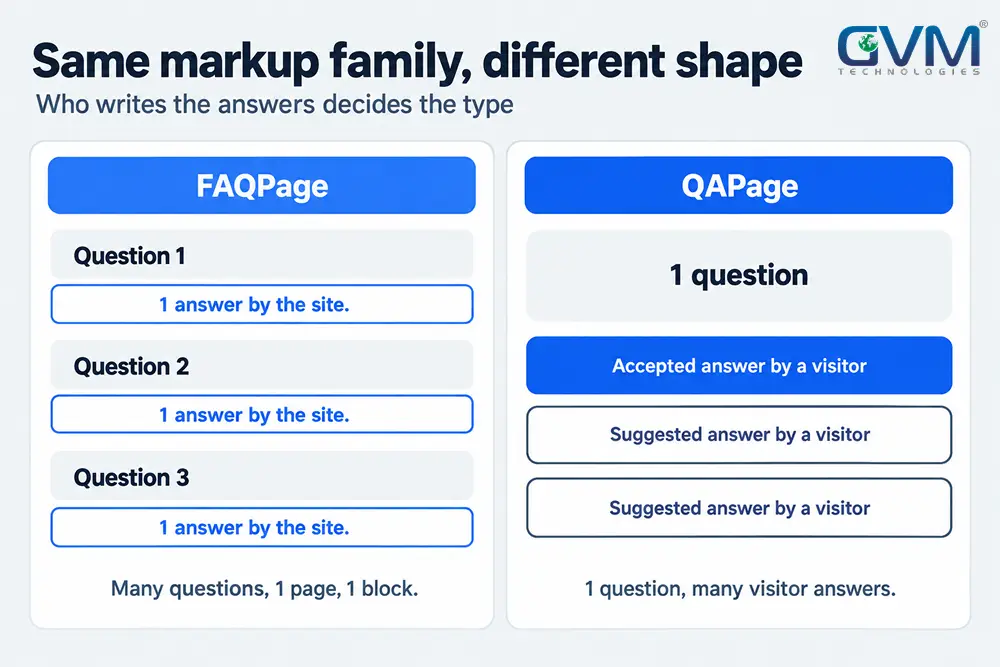
FAQPage schema labels a page of questions that the publisher answers, with 1 official answer each. QAPage schema labels a page about 1 question that users answer, with an accepted answer and suggested ones.
The table below compares FAQPage vs QAPage schema across 6 factors. Here, mainEntity is the property that holds the questions.
| Factor | FAQPage | QAPage |
|---|---|---|
| Who writes answers | The site publisher | Visitors or community members |
| Questions per page | 1 or more | Exactly 1 |
| Answers per question | 1 official answer | 1 accepted, plus suggested answers |
| Typical page | Service FAQ, policy page, help article | Forum thread, community Q&A page |
| Google rich result, Oct 2026 | Ended May 7, 2026 | Still documented as current |
| Core markup | mainEntity list of Question items | mainEntity single Question, answerCount |
1. How FAQPage schema is built
schema.org defines FAQPage as a page that presents frequently asked questions. In practice, 1 block lists every visible question and answer. A roofing company with 6 repair questions on a service page adds 1 FAQPage block.
- The page carries 1 FAQPage, with all questions inside 1 mainEntity list.
- Each Question holds a name and an acceptedAnswer with the full text.
- Every question and answer also appears as visible text on the page.
FAQ blocks mainly serve answer engine optimization (AEO), 1 of 3 overlapping optimization types.
2. How QAPage schema is built
QAPage schema wraps 1 question and the replies it received, which makes it a type for user-generated content. A community thread titled “Why does my AC freeze up?” with 5 homeowner replies fits.
- The page carries 1 QAPage, and mainEntity holds a single Question.
- The Question needs a name, an answerCount, and at least 1 acceptedAnswer or suggestedAnswer.
- Google recommends upvoteCount, author, and datePublished on the question and its answers.
- Visitors need a way to post their own answers on the page.
3. Why FAQPage vs QAPage schema gets confused
Plenty of site owners get stuck for 4 reasons:
- The names FAQPage and QAPage sound interchangeable.
- schema.org’s QAPage entry is looser than Google’s rules, and even mentions FAQ-style pages.
- Google’s rule is stricter: a QAPage is no place for an FAQ list or any page with several questions.
- Old advice lingers. The 2023 limit to government and health sites covered the FAQ rich result display, not whether the markup was valid.
Calling FAQ schema a trick for AI answers adds more noise, because AI search extends classic SEO rather than replacing it.
Does Google Still Support FAQPage vs QAPage Schema in 2026?
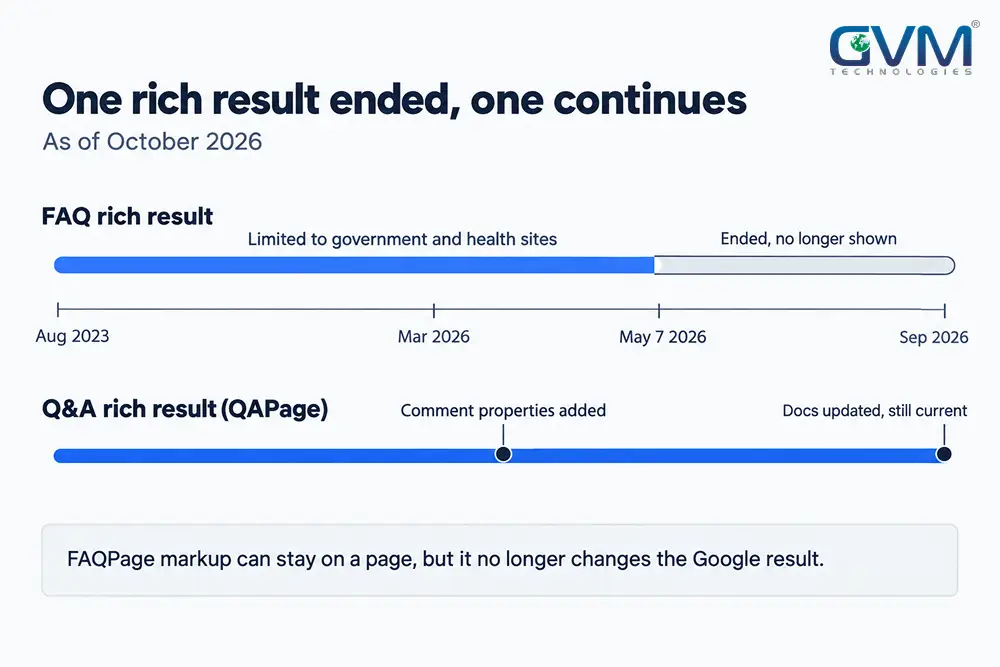
Google supports the QAPage rich result and has retired the FAQ rich result. FAQPage markup can stay on a page, but it no longer changes how your listing looks in Google Search.
The timeline shows how fast the FAQ side changed.
| Date | What happened |
|---|---|
| Aug 2023 | FAQ rich results limited mainly to government and health sites |
| Mar 24, 2026 | Google added QAPage comment-thread properties |
| May 7, 2026 | FAQ rich results stopped appearing in Google Search |
| Jun 15, 2026 | Google removed its FAQ rich result documentation |
| Sep 8, 2026 | QAPage documentation last updated, still current |
1. What ended for FAQPage
- Google Search no longer shows the expandable FAQ result under a listing, as Google’s FAQ documentation records.
- The Rich Results Test (Google’s markup checker) and the Search Console FAQ report (Google’s free site report) lost FAQ support in June 2026.
- Existing markup does not break, because the FAQPage vocabulary stays valid.
2. What still works for QAPage
Google still lists Q&A results as a live feature and points to Search Console and its Rich Results Test for checks. Eligibility is narrow, though.
Visitors need a way to post answers, and 1 question must be the page’s focus. Google also warns against applying QAPage markup sitewide.
3. What AI search does with FAQPage vs QAPage schema
- No AI platform we know of documents a FAQPage or QAPage requirement.
- In our experience, visible and standalone answers carry the weight, and markup only labels them.
- No public controlled test separates the 2 types, so read any claim of doubled citations as unproven.
- On 2026-10-09, Google AI Mode still described FAQ rich results as limited, not ended, so verify schema advice against Google’s documentation.
How AI search engines pick sources lists what vendors actually confirm. GVM Technologies treats FAQ schema as a labeling job that comes after the answers are clear.
Which FAQPage vs QAPage Schema Do You Actually Need?
Most business sites need FAQPage at most, and only when the page shows a real FAQ. QAPage fits only a page where 1 question collects user answers. Plenty of pages need neither.
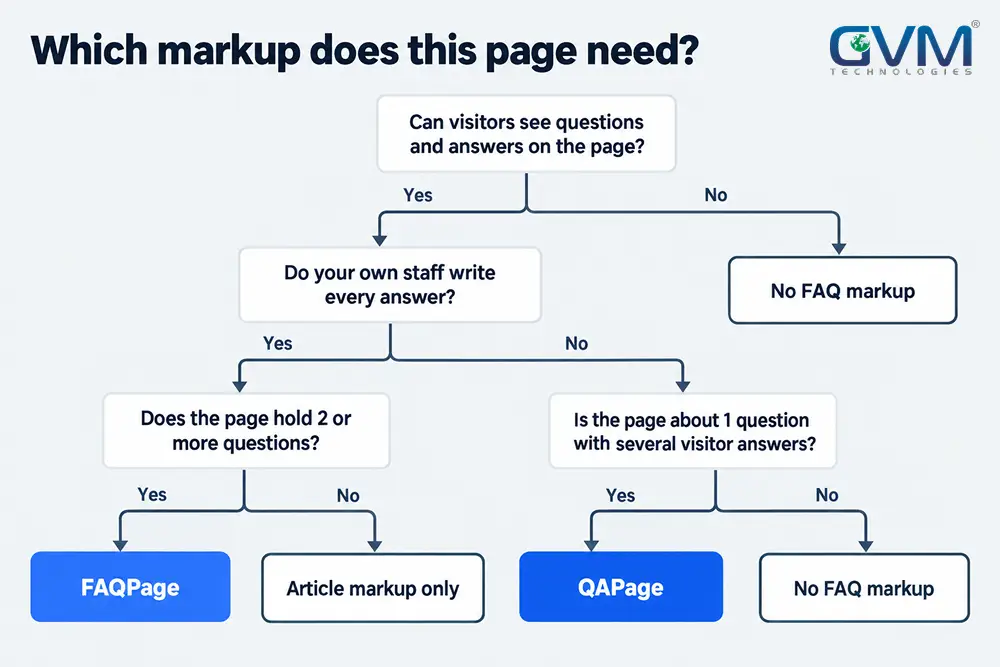
1. The 4-step FAQPage vs QAPage schema decision path
- Visible Q&A: if visitors cannot see the questions and answers, add no FAQ schema.
- Author: if your team writes every answer, go to step 3. If visitors write answers, go to step 4.
- Question count: 2 or more questions means FAQPage. A single question you answered needs only Article schema.
- Thread: 1 question with several visitor replies gets QAPage. A page of unrelated questions gets neither.
2. Page-type map for FAQPage vs QAPage schema
| Page | Best fit | Why |
|---|---|---|
| Service page with 6 visible FAQs | FAQPage | Your team answers every question |
| Blog post ending in a 5 question FAQ | FAQPage on that block | The questions are visible and authored |
| Forum thread with 1 question, 8 replies | QAPage | Visitors answer 1 question |
| Product page with 12 customer questions | Neither type | QAPage allows 1 question per page |
| Support article you wrote for 1 question | Article | No visitor answers exist |
| FAQ present only in markup | Neither type | Markup must match visible text |
3. When you need neither
- A page that asks 1 casual question inside an article.
- FAQ text that exists only in markup, never on screen.
- Questions written only to carry markup.
For many pages, the FAQPage vs QAPage schema question ends with neither. Visible questions plus Article schema already make a finished page.
Crawl access and rendering matter more, so GVM Technologies begins with the technical work that comes before markup.
4. The ask-the-expert edge case
Many “ask the expert” pages sit between the 2 types. Visitors submit questions, but only your staff answer. Because no visitor answers exist, QAPage does not fit.
Choose by layout instead:
- 1 page, many staff answers: FAQPage.
- 1 URL per question, visitors can reply: QAPage on each URL.
- 1 URL per question, staff reply only: Article, with FAQ schema optional.
FAQPage vs QAPage Schema Mistakes, With a Fix for Each
The most common FAQPage vs QAPage schema mistake is choosing the type by habit instead of by page. Google’s structured data guidelines require markup to match visible content, so a mismatch can cost rich result eligibility.
| Mistake | Why it fails | Fix |
|---|---|---|
| QAPage on a company FAQ | Google bars QAPage for FAQ pages | Switch to FAQPage |
| 1 FAQPage block per question | The page should hold 1 FAQPage | Merge into 1 mainEntity list |
| Markup lists 10 questions, page shows 4 | Markup must match visible text | Show all 10 or trim |
| FAQPage and QAPage on 1 page | The page has no single purpose | Pick the main purpose |
| Answers built only by script | AI crawlers may never see them | Put text in the HTML |
The plugin that marked 2 of 10 questions
A common complaint: an SEO plugin marked up 2 FAQs while the page shows 10. The plugin’s FAQ block marks only questions placed inside that block, and the other 8 sit in ordinary headings.
Fix it in 1 of 2 ways:
- Move all 10 questions into the plugin’s block.
- Edit the single FAQPage list by hand.
The number of Question items should equal the number of visible questions. Check the JSON-LD, the block of code that holds your schema, against what visitors can read.
Comments do not make a QAPage
Under FAQPage vs QAPage schema rules, a blog post with a comment section is still an Article. Google’s QAPage guidance excludes blog posts, so reader comments do not turn the page into 1 question with answers.
How to Add and Check FAQPage vs QAPage Schema
Write the visible questions first, add the matching type second, then validate after every edit. Schema labels content, so it cannot repair unclear answers.
Adding FAQPage vs QAPage schema therefore starts with the text, not the code. That order matches a sensible first month of GEO work.
1. Add FAQPage in 5 steps
- Collect 3 to 8 questions that buyers ask on sales calls and in support email.
- Answer each in its first sentence, then add detail.
- Print each question and its answer in the page HTML itself, beyond the markup.
- Add 1 FAQPage block that lists every question under mainEntity.
- Validate, publish, then recheck after each content edit.
2. Which validator checks FAQPage vs QAPage schema
- FAQPage: the Schema Markup Validator, because Google’s Rich Results Test dropped FAQ support.
- QAPage: Google’s Rich Results Test plus Search Console, per Google’s QAPage documentation.
- Both: the rendered page source, because script-built answers can stay invisible to AI crawlers.
3. Keep answers worth quoting
- Name the subject in every answer so the text works alone.
- Refresh answers when prices, policies, or dates change.
- Log whether AI answers quote you, using a repeat-prompt citation baseline.
4. Time, cost, and what to expect
- Time: in our experience, 1 FAQ section takes 1 to 2 hours, mostly spent writing answers.
- Cost: free tools cover everything: Schema Markup Validator, Search Console, and Rich Results Test.
- Results: Google does not guarantee any structured data feature, and QAPage results depend on page eligibility.
- Recrawl: expect days to weeks before a changed page reappears in a tool.
FAQPage vs QAPage Schema Myths, Checked
Most claims about FAQPage vs QAPage schema fail on 1 point: they credit the markup for work that visible content does. Here are 5 popular claims, checked against Google’s documentation.
| Claim | Verdict | Why |
|---|---|---|
| FAQ schema works only for government and health sites | Outdated | No site gets FAQ rich results now |
| FAQPage schema gets you into People Also Ask | Unproven | No Google page lists schema for it |
| AI engines cite only pages with FAQ schema | Unproven | Google’s guide lists no such rule |
| Use both types for double coverage | False | 1 page, 1 purpose |
| Delete all FAQ schema now | Too strong | Accurate markup is harmless |
Remove markup that is stale, hidden, or wrong. Leave accurate markup alone and spend the saved time on the visible answers.
A vendor promising citations from schema alone is selling something unproven. Why guaranteed citations deserve suspicion applies here too.
FAQs
1. Can I use FAQPage and QAPage on the same page?
No. In FAQPage vs QAPage schema, 1 page gets 1 type, chosen by the page’s main purpose. Google bars QAPage on multi-question pages, so a thread’s side FAQ stays plain text.
2. Is FAQ schema still worth adding in 2026?
Only when the page shows a real FAQ. Google no longer displays FAQ results, so add FAQ schema for machine clarity, not for a visible result. Existing markup that matches the page can stay.
3. Does QAPage work for blog posts or product pages?
No. Google excludes blog posts and FAQ pages. A product page with many customer questions has several questions, so it does not fit either.
4. Do I need FAQPage or QAPage for ChatGPT Search, Perplexity, or Google AI Mode?
No documented requirement exists, and Google’s guide names no markup for AI Overviews or AI Mode. Clear visible answers and crawler access do the work, and honest AI visibility reporting shows whether they do.
5. Why did my FAQ dropdown disappear from Google results?
On May 7, 2026, Google ended that display for every site. Nothing on your page broke, and your FAQ schema stays valid.
Conclusion
The FAQPage vs QAPage schema decision is about authorship: answers you wrote, or answers your visitors wrote. For most sites, the honest choice is FAQPage on a visible FAQ, or no FAQ schema at all.
Here is the order to follow:
- Today: list every page that carries FAQ schema or Q&A schema, with its type.
- This week: match each block to visible text, and fix any QAPage on a non-community page.
- This month: merge duplicate FAQPage blocks, then validate each type with the right tool.
- Every quarter: reread Google Search Central’s structured data documentation, because FAQ rich results ended within 6 weeks of the notice.
Expect more schema types to lose display roles. Clear, visible answers tend to outlast every markup change.
Fix Markup That Validates but Misleads
Your FAQPage vs QAPage schema passes a validator, yet nobody can say whether it still matches the page. Each stale block keeps describing answers you may have changed months ago.
The free audit from GVM Technologies covers 4 checks:
- Technical SEO health: crawling, indexing, and rendering of your key pages
- Crawler readiness for AI: structured data, consistent brand facts, and FAQ coverage
- Content gaps: buyer questions your pages leave unanswered
- Fix list: a ranked action plan and schedule, walked through on a call
Founded in 2012, GVM Technologies runs SEO plus generative engine optimization through 1 team under 3 ISO certifications, and its published case studies include a floral e-commerce store, a real estate group, and a trucking insurer.
You leave knowing which markup to keep, fix, or delete.